

Intake
Description
The Intake section provides three key report tabs to monitor and manage cattle feed consumption effectively. It includes detailed data about feed intake, costs, and dry matter consumption (DMI) by pen. Users can filter by pens and date ranges to analyze specific feeding events. The section supports navigation between different views including Yesterday, History, and DMI Summary.
Key Features
Yesterday
Main Features
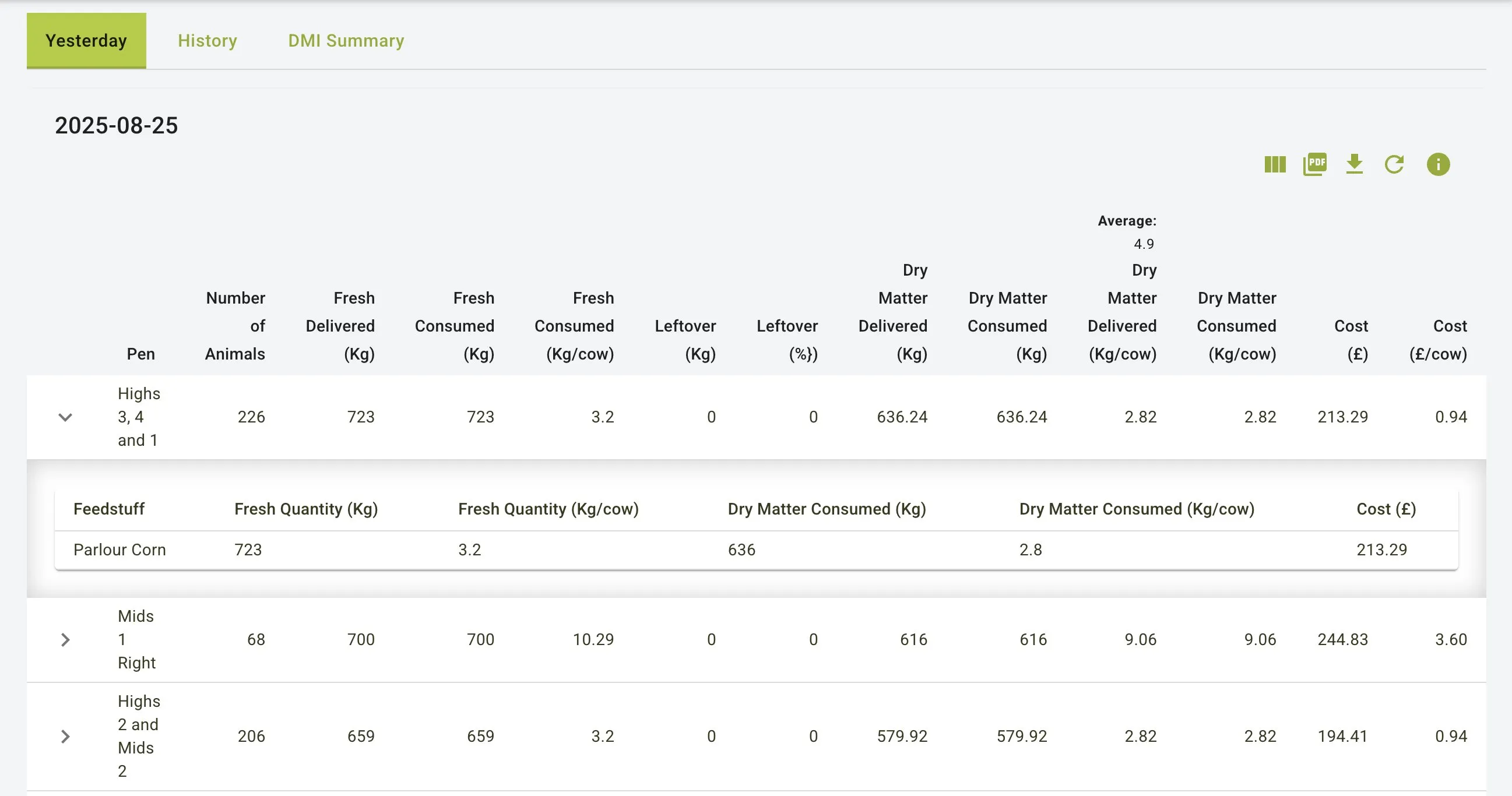
- Displays a snapshot of feed data for the previous day
- Provides key metrics for each pen to monitor feed intake, waste, and cost efficiency
- Shows expandable rows that reveal ingredient-specific data
- Provides cost analysis for each pen and ingredient
Yesterday Tab View
Filters and Navigation
- Pen Selector: Filter to display data for specific pens
- Export Options: Download reports in PDF or Excel format
- Refresh Button: Update data to reflect the latest information
Detailed Pen Information
- Each row represents a pen with comprehensive information:
- Pen: Name of the pen (e.g., “Highs 3, 4 and 1”)
- Number of Animals: Total animals in the pen
- Fresh Delivered (Kg): Total feed delivered to the pen
- Fresh Consumed (Kg): Actual amount consumed by animals
- Fresh Consumed (Kg/cow): Average feed consumed per animal
- Leftover (Kg): Amount of feed not consumed
- Leftover (%): Percentage of feed wasted
- Dry Matter Delivered (Kg): Total dry matter delivered
- Dry Matter Consumed (Kg): Actual dry matter consumed
- Dry Matter Delivered (Kg/cow): Average dry matter delivered per animal
- Dry Matter Consumed (Kg/cow): Average dry matter consumed per animal
- Cost (€): Total feed cost for the pen
- Cost (€/cow): Average feed cost per animal
Expandable Pen Details
- Click on any pen row to expand and view:
- Feedstuff: Types of feed provided to the pen
- Fresh Quantity (Kg): Amount of each feedstuff provided
- Fresh Quantity (Kg/cow): Amount per animal
- Dry Matter Consumed (Kg): Total dry matter intake by feedstuff
- Dry Matter Consumed (Kg/cow): Dry matter intake per animal by feedstuff
- Cost (€): Cost breakdown by feedstuff
History
Main Features
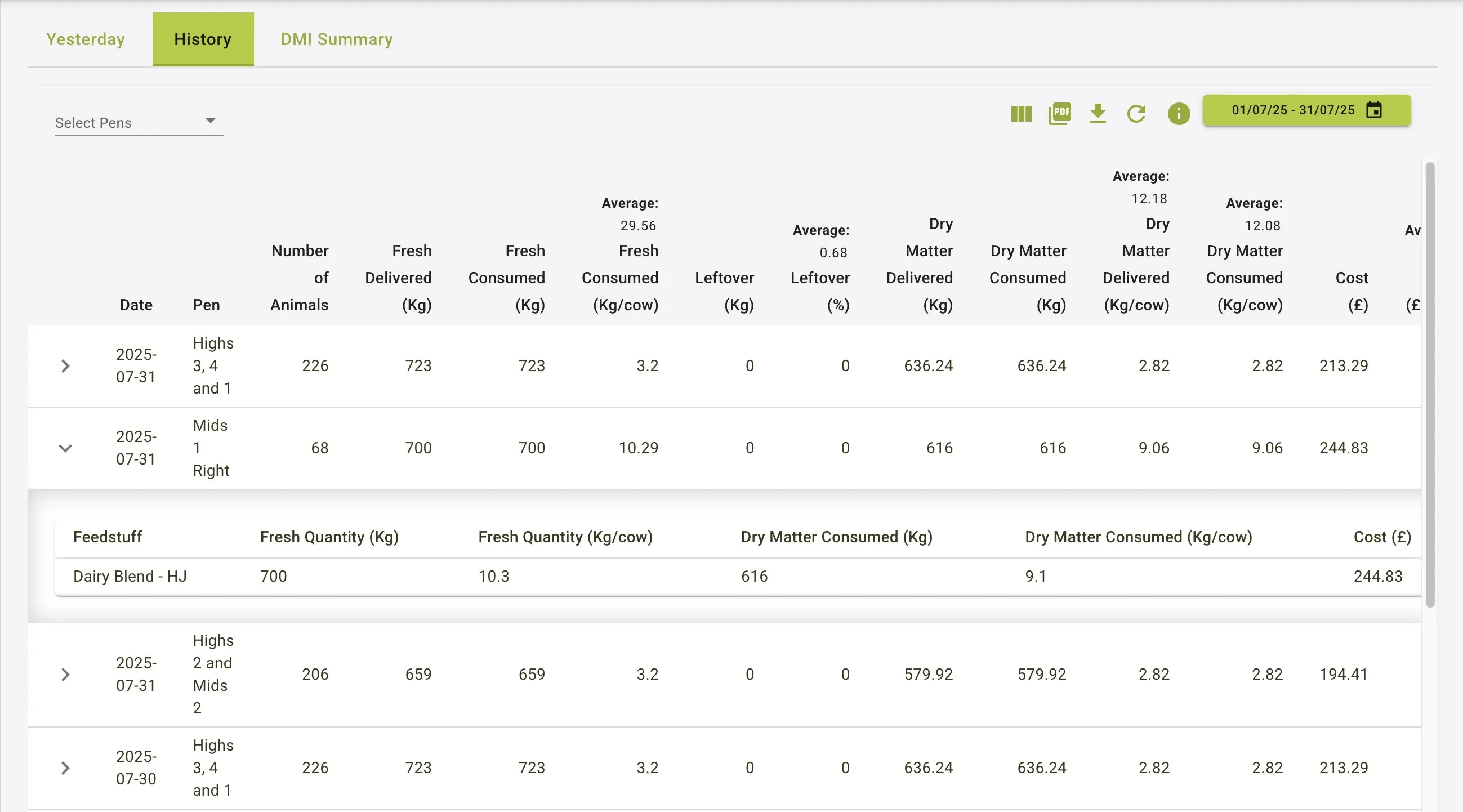
- Allows users to review feed data over a customizable date range
- Enables comparison and trend analysis of feed metrics over time
- Provides detailed breakdown of feed consumption by pen
- Shows expandable rows that reveal ingredient-specific data
History Tab View
Filters and Navigation
- Pen Selector: Filter to display data for specific pens
- Date Range Selector: Choose specific dates for analysis
- Export Options: Download reports in PDF or Excel format
- Refresh Button: Update data to reflect the latest information
Detailed Information
- Each row includes:
- Date: Specific date of the feeding record
- Pen: Name of the pen
- Number of Animals: Total animals in the pen
- Fresh Delivered (Kg): Total feed delivered
- Fresh Consumed (Kg): Actual amount consumed
- Fresh Consumed (Kg/cow): Average feed consumed per animal
- Leftover (Kg): Amount of feed not consumed
- Leftover (%): Percentage of feed wasted
- Dry Matter Delivered (Kg): Total dry matter delivered
- Dry Matter Consumed (Kg): Actual dry matter consumed
- Dry Matter Delivered (Kg/cow): Average dry matter delivered per animal
- Dry Matter Consumed (Kg/cow): Average dry matter consumed per animal
- Cost (€): Total feed cost
- Cost (€/cow): Average feed cost per animal
Expandable Details
- Clicking on any row reveals ingredient-specific data:
- Feedstuff: Types of feed provided (e.g., “Dairy Blend - HJ”)
- Fresh Quantity (Kg): Amount of each feedstuff provided
- Fresh Quantity (Kg/cow): Amount per animal
- Dry Matter Consumed (Kg): Total dry matter intake by feedstuff
- Dry Matter Consumed (Kg/cow): Dry matter intake per animal by feedstuff
- Cost (€): Cost breakdown by feedstuff
DMI Summary
Main Features
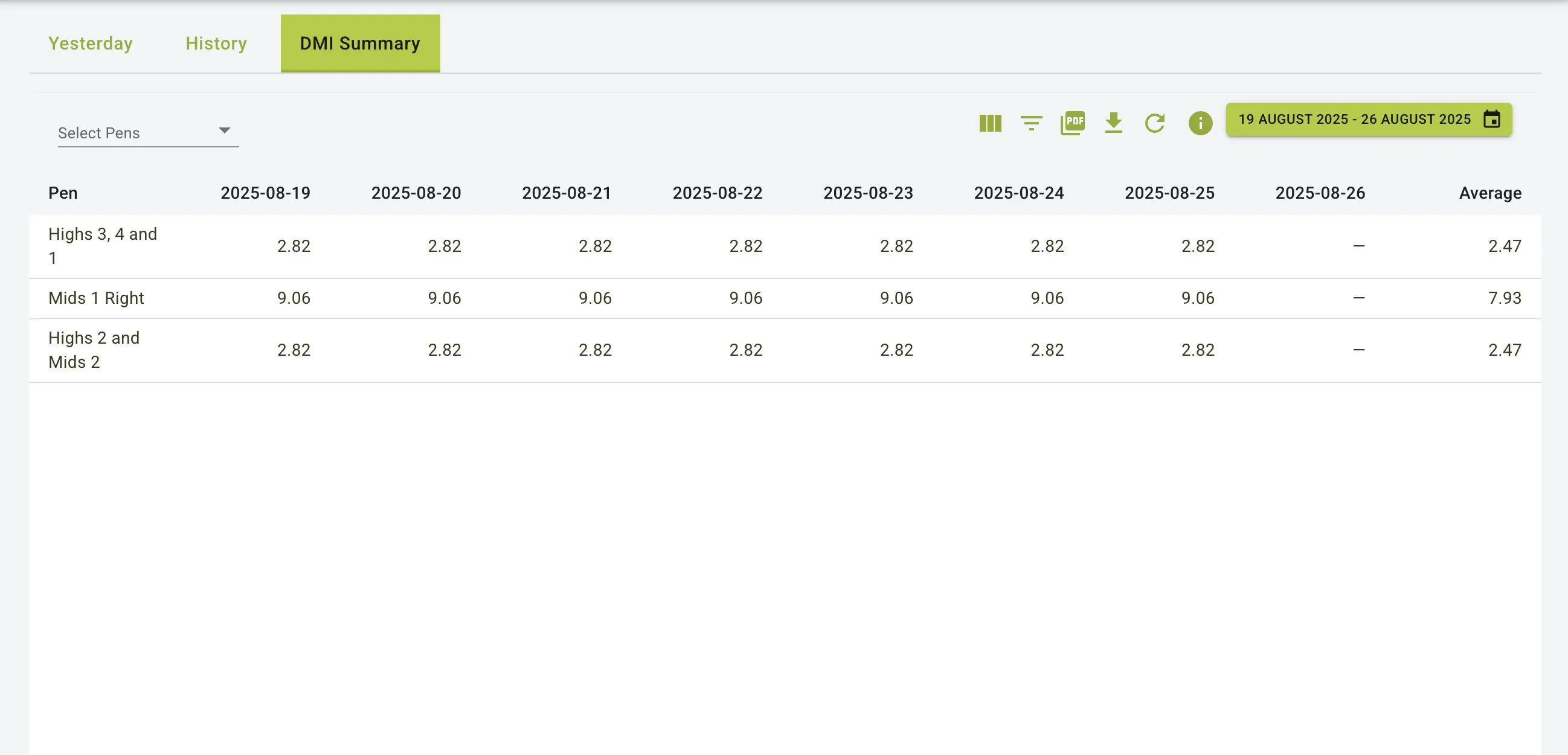
- Provides a detailed overview of daily Dry Matter Intake (DMI) for each pen
- Displays data across a selected date range in a tabular format
- Enables easy comparison of DMI values across different days
- Calculates averages for the selected period
DMI Summary View
Filters and Navigation
- Pen Selector: Filter to display data for specific pens
- Date Range Selector: Choose specific date ranges for analysis
- Export Options: Download reports in PDF or Excel format
- Refresh Button: Update data to reflect the latest information
Detailed Information
-
Table with the following structure:
- Pen Column: Lists all pens being tracked
- Date Columns: Each column represents a specific date in the selected range
- Average Column: Shows the average DMI for each pen across the date range
-
Each cell contains:
- The Dry Matter Consumed (Kg/cow) value for that specific pen on that specific date
- Consistent format for easy comparison across dates and pens
Key Values
- Each value represents the average Dry Matter Intake per cow for each pen
- Consistent daily tracking allows for identification of trends or anomalies
- Average column provides a quick reference for overall performance
Practical Use Cases
Analysing Feed Efficiency
- Review the Yesterday tab to monitor daily feeding performance and identify issues
- Compare planned versus consumed quantities to optimize feed utilization
- Identify feed waste patterns by reviewing leftover percentages
Managing Feed Costs
- Track ingredient-specific and total costs across different pens
- Identify cost variations across days or weeks using the History tab
- Use the DMI Summary view to compare feeding costs and consumption patterns over time
- Monitor cost per animal metrics for economic analysis
Nutritional Monitoring
- Track dry matter intake per cow across different pens
- Ensure animals are receiving proper nutrition by monitoring actual vs. planned consumption
- Use DMI Summary to identify trends or anomalies in feed consumption
- Compare DMI values with production metrics to optimize feeding strategies
Summary
The Intake feature serves as a powerful tool for monitoring and analysing feed consumption patterns. With its comprehensive views (Yesterday, History, and DMI Summary), it enables users to:
- Monitor daily feeding performance and identify immediate issues
- Track feed consumption and costs over extended periods
- Analyze dry matter intake trends across different pens
- Maintain accurate records of feed utilization
- Optimize feeding strategies based on historical data
By providing detailed data visualizations and flexible filtering options, the Intake feature helps farm operations maintain accurate records, optimize feed efficiency, and control costs.