

Loads
Description
The Loads page provides a comprehensive view of the loading and unloading process for feed management. It includes detailed data about ingredients loaded, unloaded quantities, accuracy, and costs. Users can filter by feed plans, operators, and date ranges to analyze specific load events. The page also supports navigation between different views including Loads, Unloads By Pen, Summary By Pen, and Summary By Group.
Key Features
Loads
Main Features
- Displays all loads with detailed information for each feed load event
- Includes expandable rows that show ingredient-specific data
- Shows load status indicators (Loading, Unloading, Completed)
- Provides cost analysis for each load and ingredient
Loads Tab View
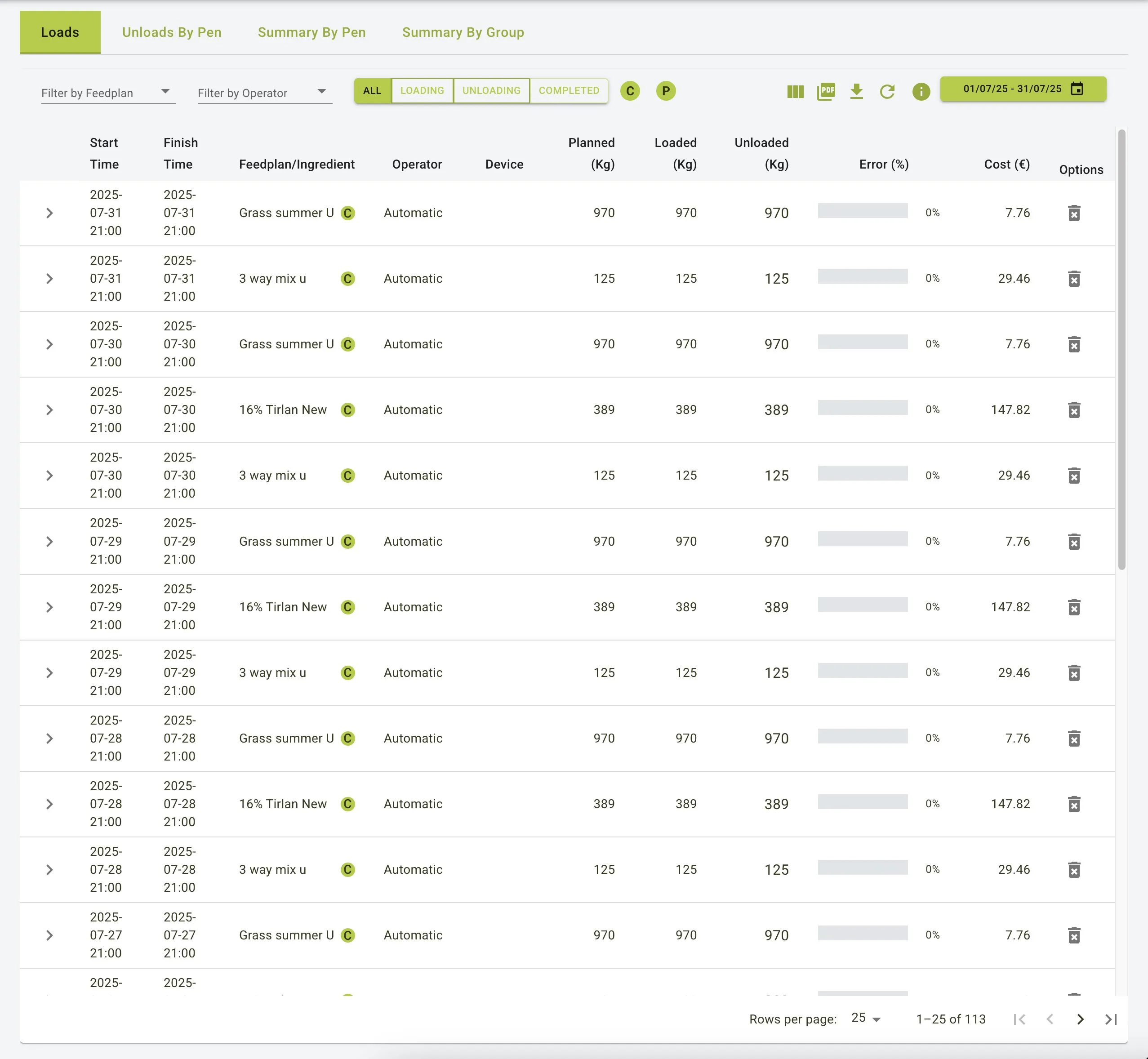
Filters and Navigation
- Date Range Selector: Select a specific date range to view loads within that period
- Feed Plan and Operator Filters: Narrow down results by selecting specific feed plans or operators
- Status Filters: Toggle between
All,Loading,Unloading, andCompletedloads - Include Concentrate Loads: Toggle concentrate loads via the
Cicon button. - Include Premix Loads: Toggle premix loads via the
Picon button. - Pagination: Navigate through multiple pages of load records
Detailed Load Information
- Each row represents a load event with comprehensive information:
- Start Time: When the load began
- Finish Time: When the load was completed
- Feed Plan/Ingredient: The feed plan or specific ingredient being loaded
- Operator: The person responsible for the load
- Device: The equipment used for loading
- Planned (Kg): The target weight of the load
- Loaded (Kg): The actual weight loaded
- Unloaded (Kg): The weight unloaded
- Error (%): The deviation from the planned weight
- Cost (€): The total cost of the load
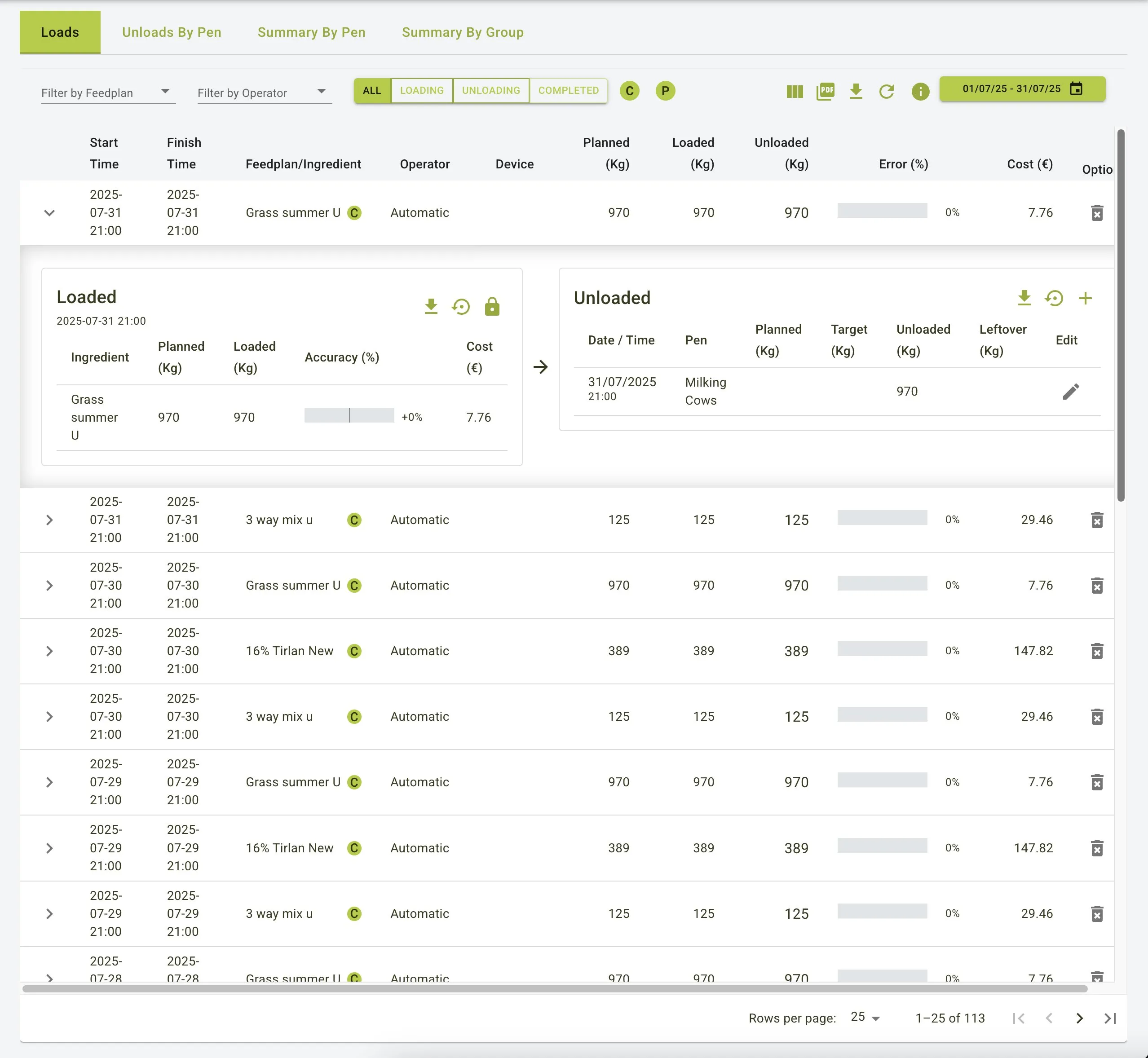
Expandable Load Details
- Click on any load row to expand and view:
- Loaded Ingredients: Shows the planned weight, loaded weight, accuracy percentage, and cost for each ingredient
- Ingredient-Specific Data: View detailed information about each ingredient in the load
- Accuracy Visualization: Color-coded indicators showing loading precision
Loads Expanded View
Unload Information
- When expanded, each load shows details about the unloading process:
- Date/Time: When the feed was unloaded
- Pen: The specific pen where feed was unloaded
- Planned (Kg): Target weight from the feedplan
- Target (Kg): Quantity per pen based on what was loaded into the mixer wagon
- Unloaded (Kg): The actual weight unloaded to each pen
- Leftover (Kg): Weight of any leftover feed
- Edit Functionality: Ability to modify unload records when needed
Adding and Managing Leftovers
- To record leftovers for a load:
- Expand the load row to view unload details
- Click the
Editbutton next to the relevant pen - Input the leftover quantity in the designated field
- Save changes to update the load record and maintain accurate feed usage data
Key Metrics and Indicators
- Accuracy (%): Indicates how closely the loaded weight matches the planned weight. Deviations are color-coded:
- Green: Within acceptable limits (typically ±5%)
- Yellow: Minor deviations (typically ±5-10%)
- Red: Significant deviations (typically >10%)
- Cost (€): Displays the cost of each ingredient and the total cost for the load
- Dry Matter (Kg): Shows the dry matter content for improved nutritional tracking
- Dry Matter (Kg/cow): Provides per-animal consumption metrics for better analysis
Common Operations
Editing Loads
Loads ingredients can be edited when discrepancies are identified. This feature allows for corrections when actual loaded quantities differ from what was recorded.
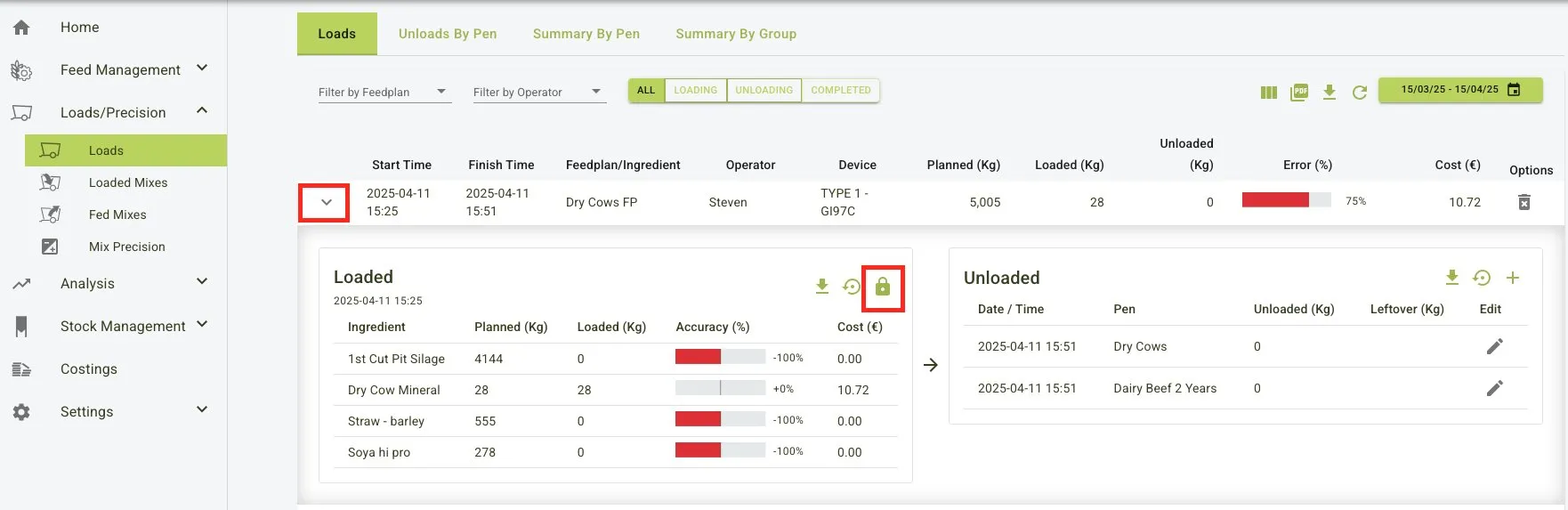
- Navigate to the loads page.
- Click the dropdown on the load to be investigated.
- Click on the lock icon, this will expand all the load ingredients.
- Click on the
Editbutton.
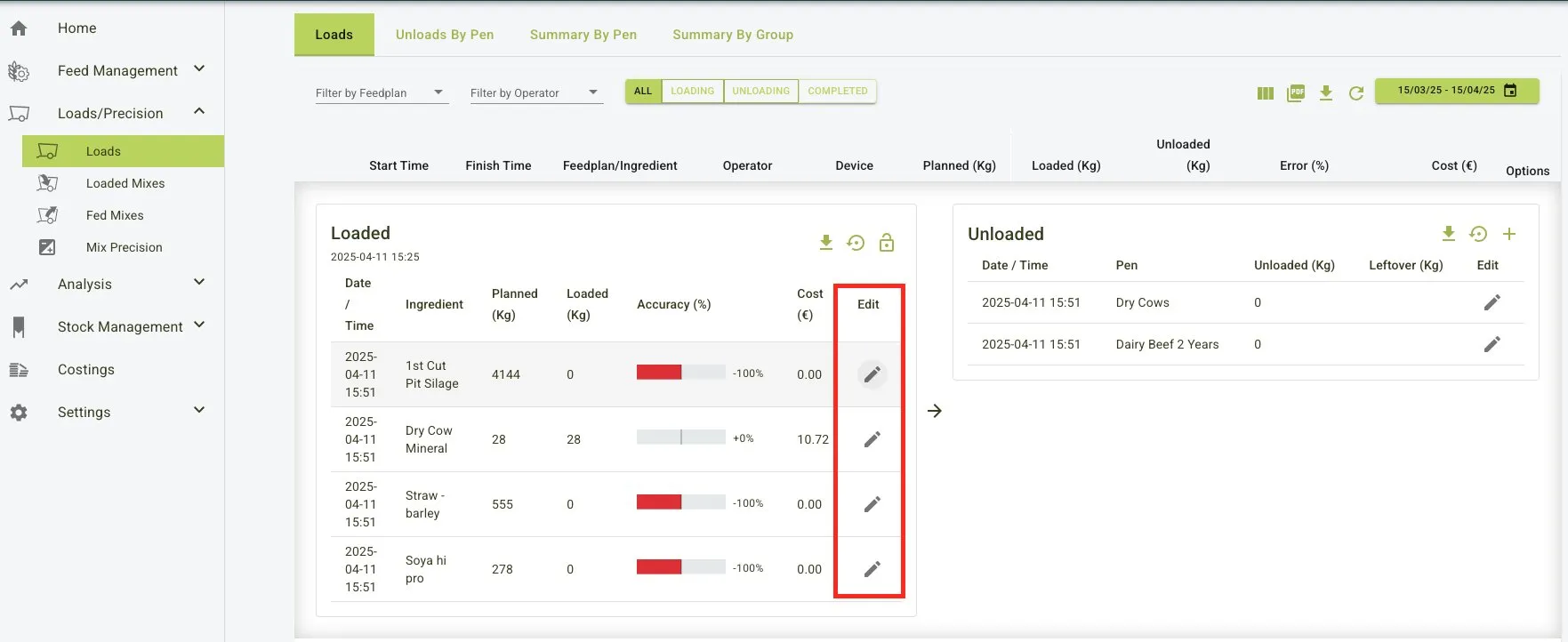
This will display another pop up tile where you enter the correct data in to the loaded input.
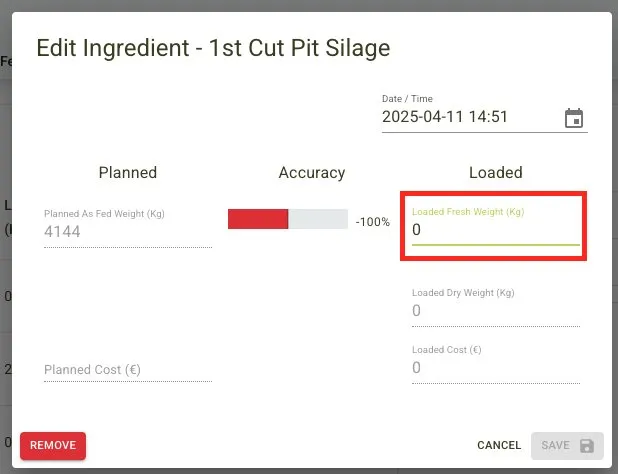
- Click
Save.
The new loaded weight should be displayed and the total loaded weight should update based on the correction.
Unloads By Pen
Main Features
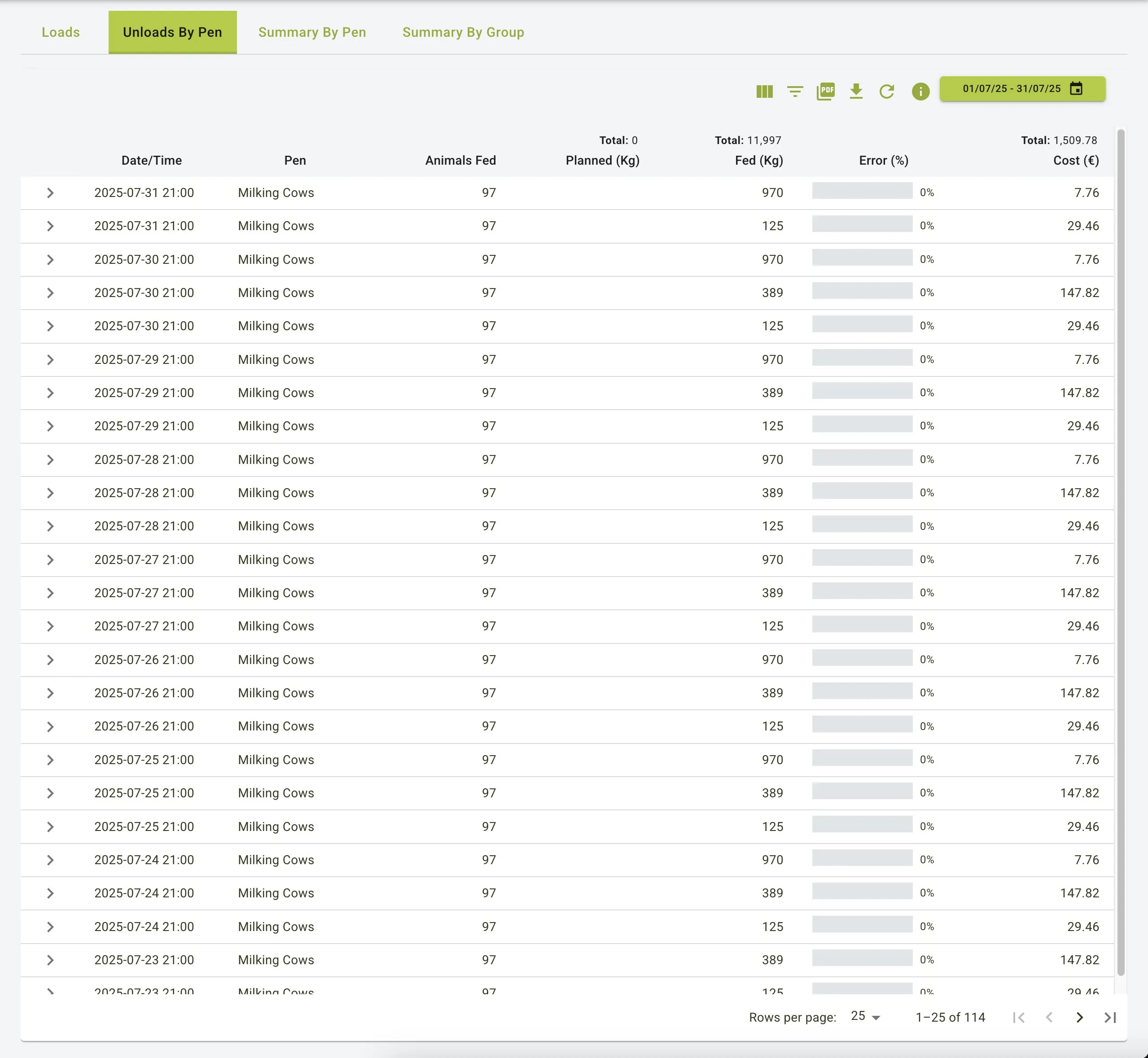
Pen Details:
- Date/Time: When the unload was performed
- Pen: Shows the specific pen (e.g., “Milking Cows”) receiving the feed
- Animals Fed: Displays the number of animals in the pen (e.g., 97 animals)
- Planned (Kg): Target weight of the feed
- Fed (Kg): Actual weight fed to the pen
- Error (%): Deviation percentage from planned weight
- Cost (€): Total cost for the feed unloaded to the pen
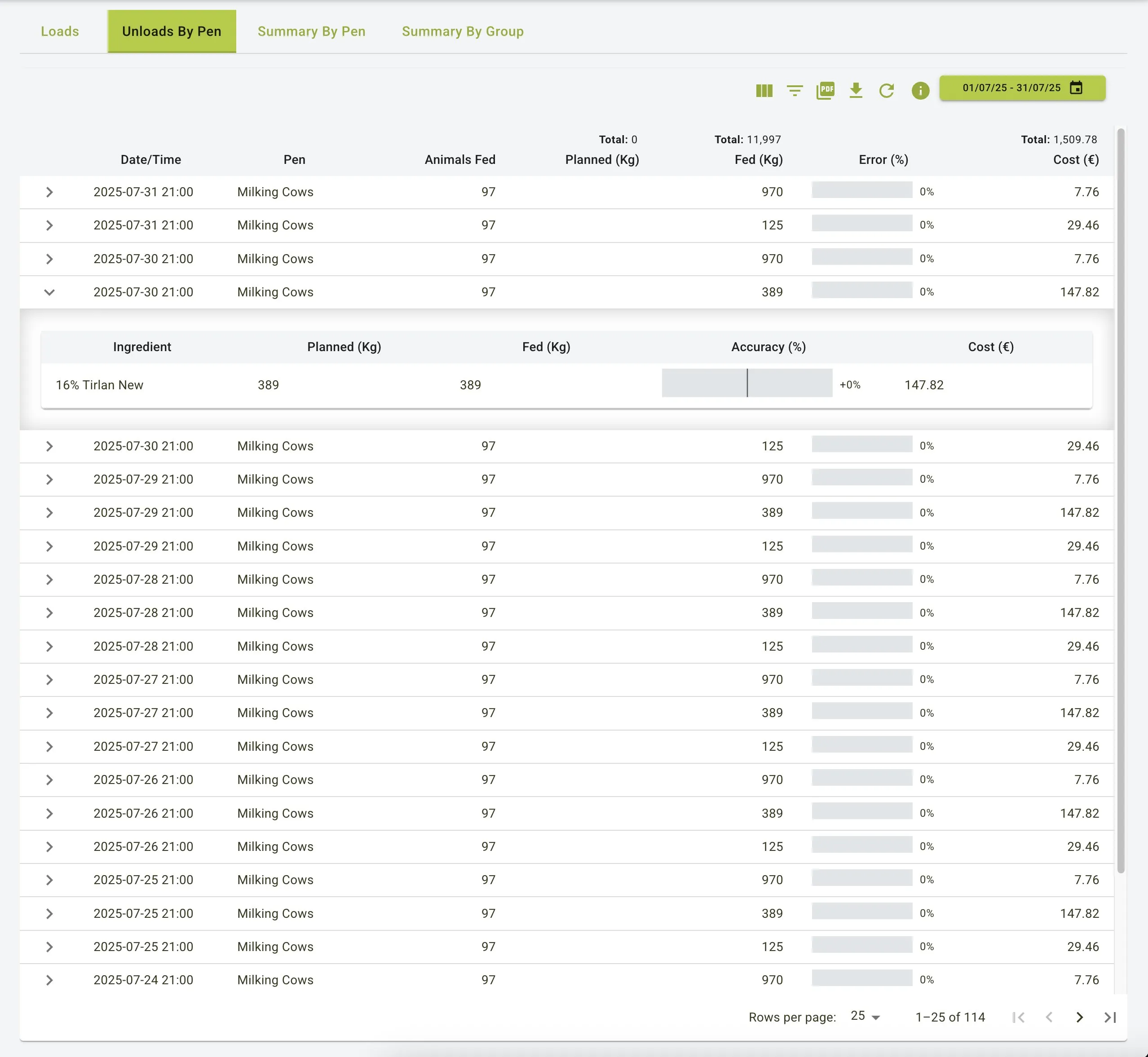
Expandable Details:
- Click on any row to view ingredient-specific information
- Shows planned vs. fed quantities for each ingredient
- Highlights accuracy percentage for individual ingredients
Unloads By Pen
Unloads By Pen - Expanded View
Summary By Pen
Main Features
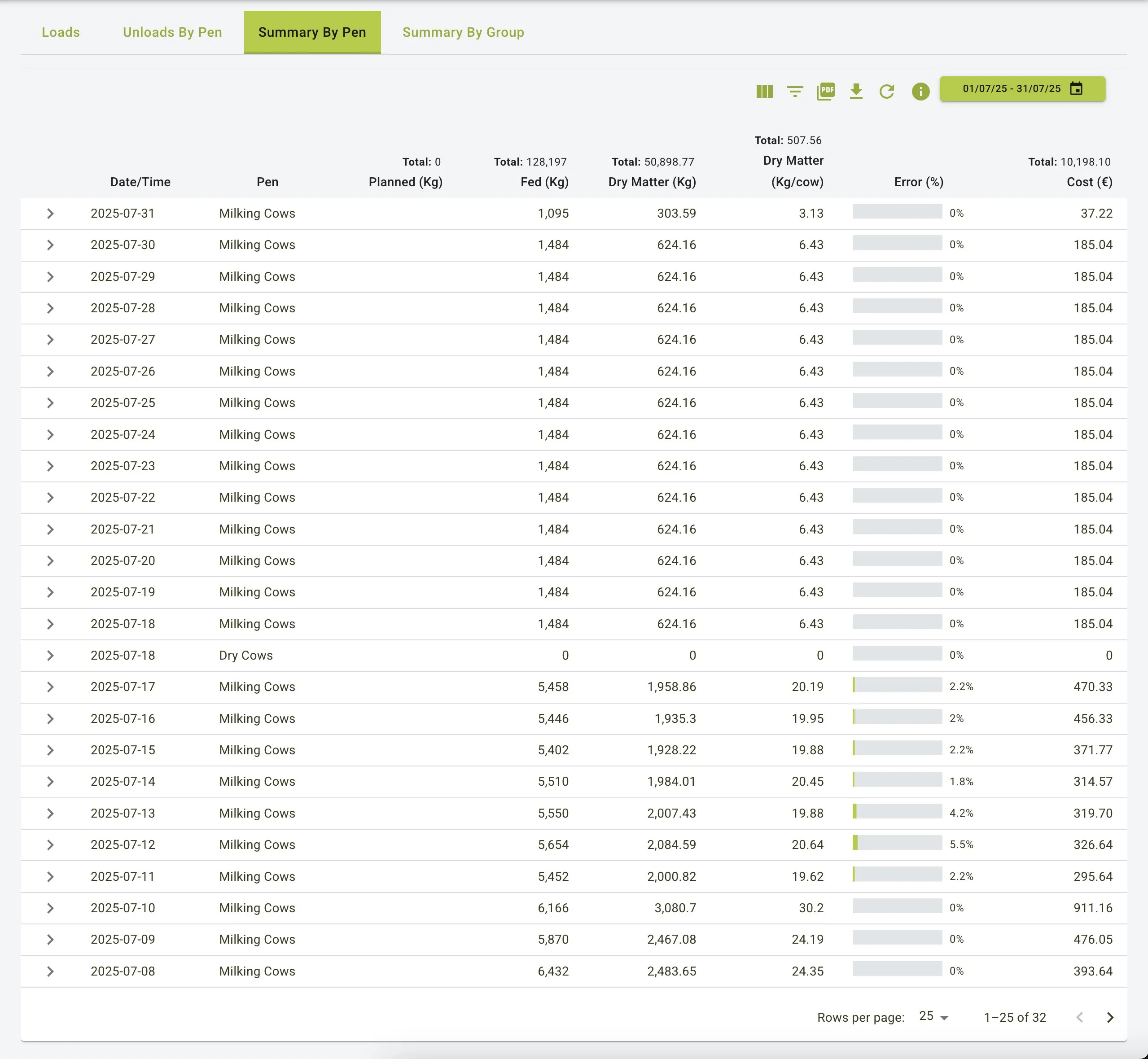
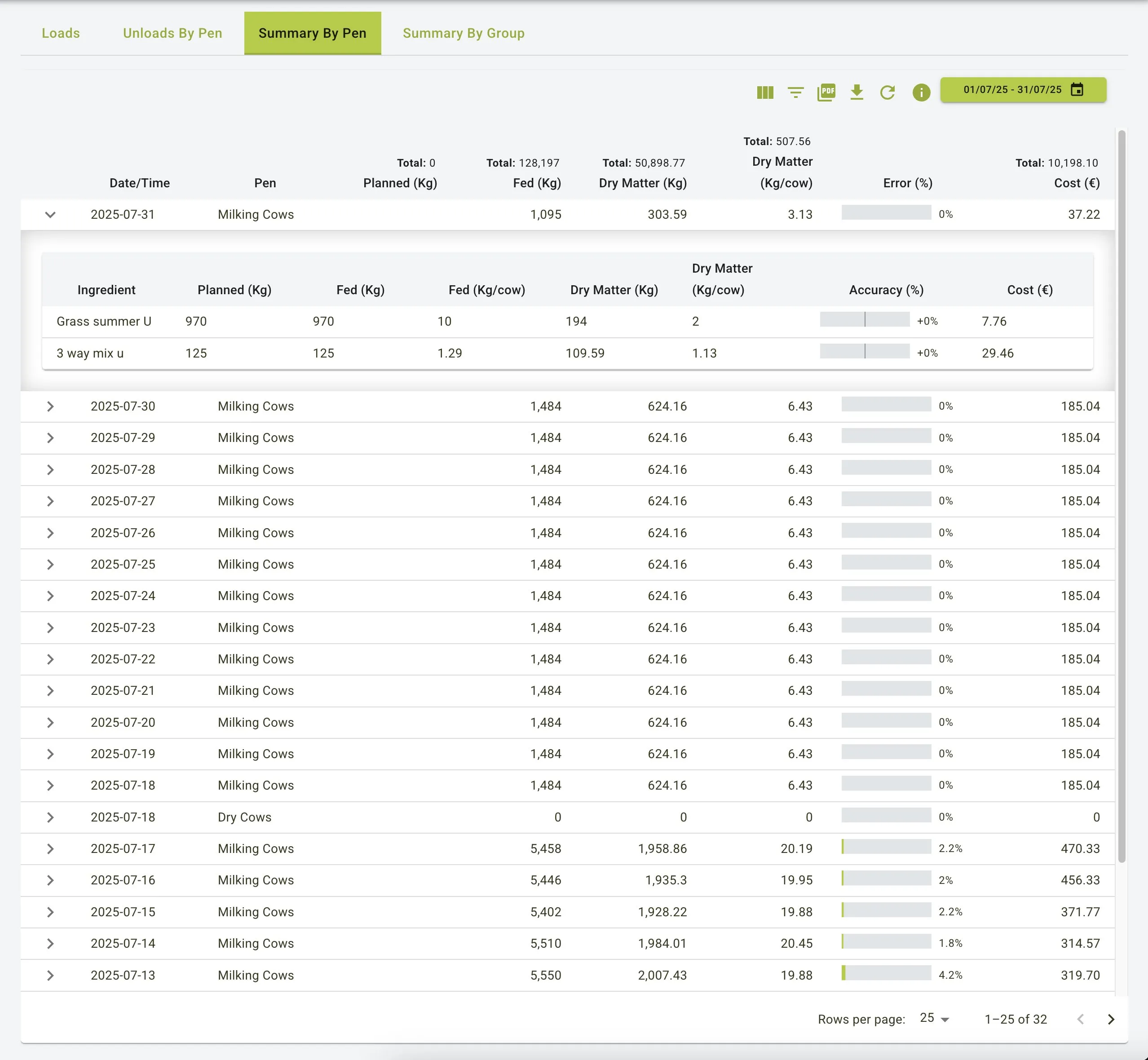
Consolidated Pen Data:
- Date/Time: Shows the date when feeding occurred
- Pen: Identifies the specific pen (e.g., “Milking Cows”)
- Planned (Kg): Total planned feed quantity
- Fed (Kg): Total actual feed delivered
- Dry Matter (Kg): Total dry matter content
- Dry Matter (Kg/cow): Per-animal dry matter consumption
- Error (%): Overall feeding accuracy
- Cost (€): Total feed cost for the pen
Ingredient-Level Analysis:
- Expand rows to see detailed breakdown by ingredient
- View planned, fed, and dry matter quantities for each ingredient
- See per-cow consumption metrics for better nutritional tracking
- Monitor accuracy and cost details at the ingredient level
Summary By Pen
Summary By Pen - Expanded View
Summary By Group
Main Features
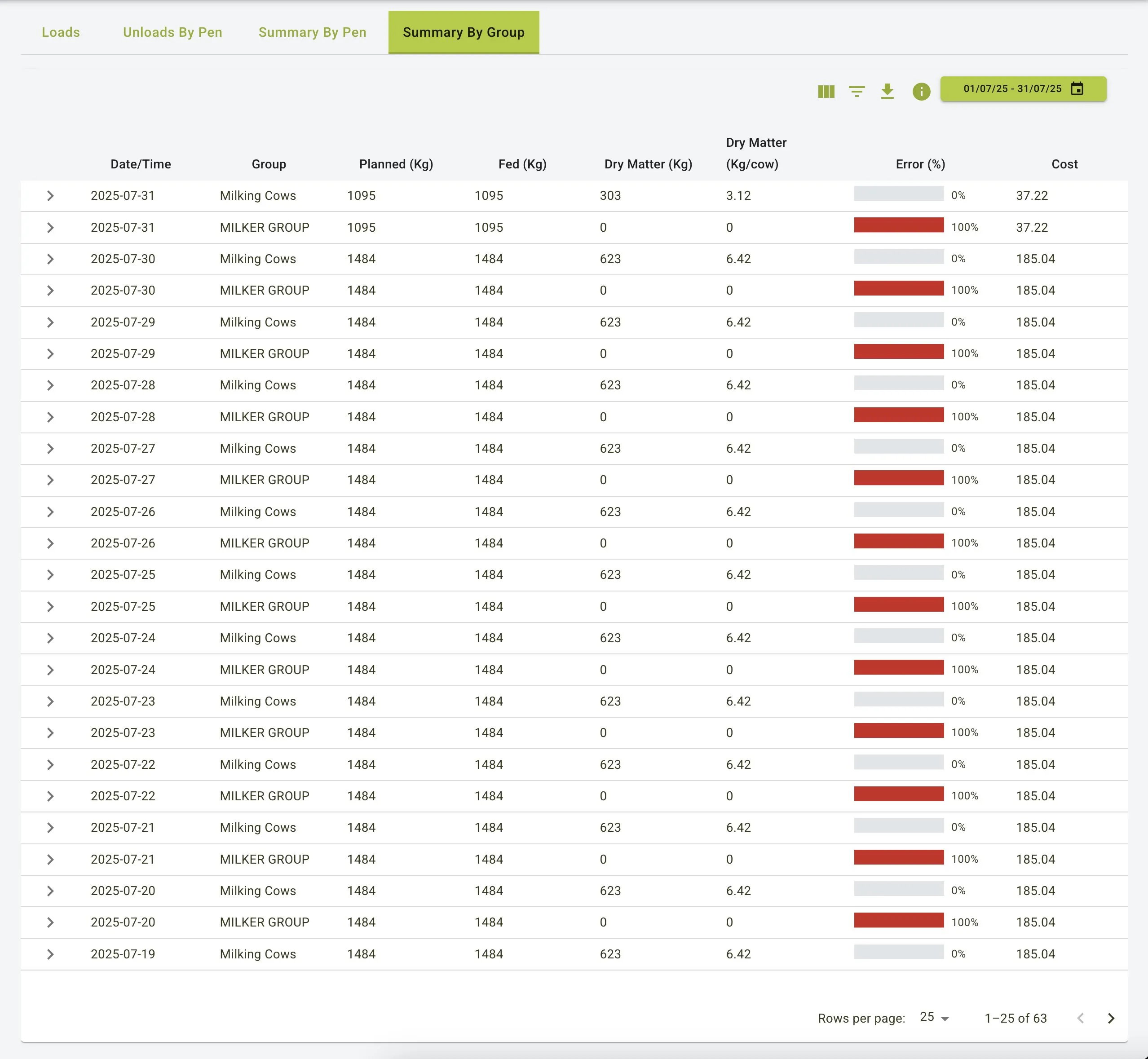
Group Details:
- Groups pens into categories (e.g., “Milking Cows”, “MILKER GROUP”)
- Shows date-based feeding information
- Displays planned and fed weights, dry matter data, and costs at the group level
- Highlights error percentages with color-coding for quick identification
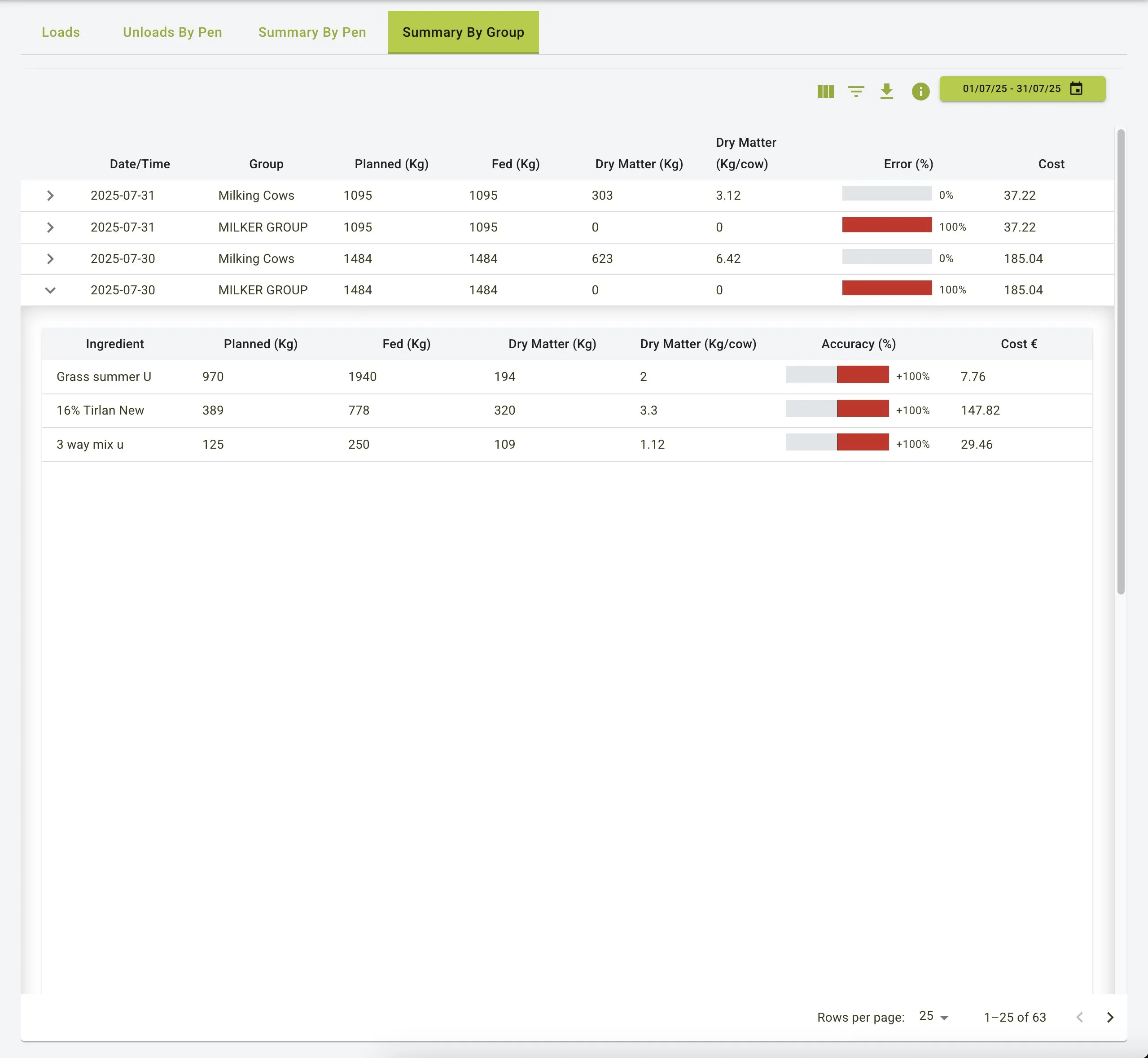
Detailed Ingredient View:
- Expand groups to see ingredient-specific details
- View dry matter consumption per cow for nutritional analysis
- Monitor accuracy metrics for each ingredient within the group
- Track costs at both group and ingredient levels
Summary By Group
Summary By Group - Expanded View
Practical Use Cases
Analysing Feed Efficiency
- Review the Loads tab to monitor operator accuracy and identify areas for improvement
- Compare planned versus loaded weights to optimize feed utilization
- Identify consistent under or overfeeding patterns by reviewing historical data
Managing Feed Costs
- Track ingredient-specific and total costs across different pens and groups
- Identify cost variations between planned and actual feeding
- Use the Summary By Group view to compare feeding costs across different animal groups
- Monitor dry matter costs for economic analysis of feed utilization
Nutritional Monitoring
- Track dry matter intake per cow across different pens and groups
- Ensure animals are receiving proper nutrition by monitoring actual vs. planned feed amounts
- Use error percentages to identify potential issues in feed delivery
Leftover Management
- Keep accurate records by editing unload details to account for leftovers
- Ensure precise tracking of feed utilization for improved inventory management
- Analyze leftover patterns to adjust feeding strategies
Summary
The Loads feature serves as a powerful tool for managing and analysing feed loading and unloading processes. With its comprehensive views (Loads, Unloads By Pen, Summary By Pen, and Summary By Group), it enables users to:
- Monitor feeding accuracy and operator performance
- Track feed costs at ingredient, pen, and group levels
- Analyze dry matter consumption across different animal groups
- Maintain accurate records of feed distribution and utilization
- Optimize feeding strategies based on historical data
By providing detailed data visualizations and flexible filtering options, the Loads feature helps farm operations maintain accurate records, optimize feed efficiency, and control costs.