

Premix
Description
The Premix section allows users to create and manage specialized mixes of ingredients that can be used as components in larger feed rations. Premixes are useful for consistently incorporating precise amounts of micro-ingredients, minerals, vitamins, and additives into your feeding program. They simplify the feeding process and ensure consistent nutrient delivery.
Key Fields
- Name: The identifier for your premix (e.g., Test Premix).
- Percentage (%): The percentage of the premix to include in the total mix (default is 100%).
- Days: The number of days the premix will be used for (helps with calculating total required amounts).
- Ingredient: The specific feeds or additives included in the premix.
- Fresh Weight: The weight of each ingredient before accounting for moisture content.
- DM%: The dry matter percentage of each ingredient.
- DM: The calculated dry matter weight of each ingredient.
- Mix Time: The time required to properly mix each ingredient (in seconds).
- Cost: The cost per unit of each ingredient.
- Auto-Load: Settings for automatic loading of ingredients.
- Auto-Progress: Settings for automatic progression through the loading sequence.
Use Case Examples
Creating a New Premix:
- Click the
Newbutton in the top-right corner. - Enter a name for your premix.
- Set the percentage and days values.
- Click on
Add/Remove Ingredientsto add the desired components. - Specify fresh weight and other parameters for each ingredient.
- Click
Saveto store your premix.
Managing Existing Premixes:
- Select a premix from the left sidebar to view or edit its details.
- Use the
Duplicatebutton to create a similar premix based on an existing one. - Click
Deleteto remove a premix that is no longer needed.
Viewing Nutrient Analysis:
- Switch to the “Nutrients” tab to view the nutritional composition of your premix.
- Review values such as Dry Matter percentage, ME Ruminants, Energy density, NDF, Starch, and Sugar content.
Generating Feed Sheets:
- Use the
Mix Sheetbutton to generate a printable feed sheet. - The feed sheet displays different load amounts and corresponding ingredient weights.
- Click
PDF Downloadto save or print the feed sheet for reference.
Benefits
- Precision Feeding: Ensures accurate inclusion of micro-ingredients in larger feed mixes.
- Consistency: Maintains uniform nutrient delivery across all feed batches.
- Time Efficiency: Simplifies the mixing process by pre-mixing frequently used ingredient combinations.
- Resource Optimization: Allows for better management of specialized or expensive ingredients.
- Nutrient Analysis: Provides detailed nutritional information about the premix composition.
Premix View
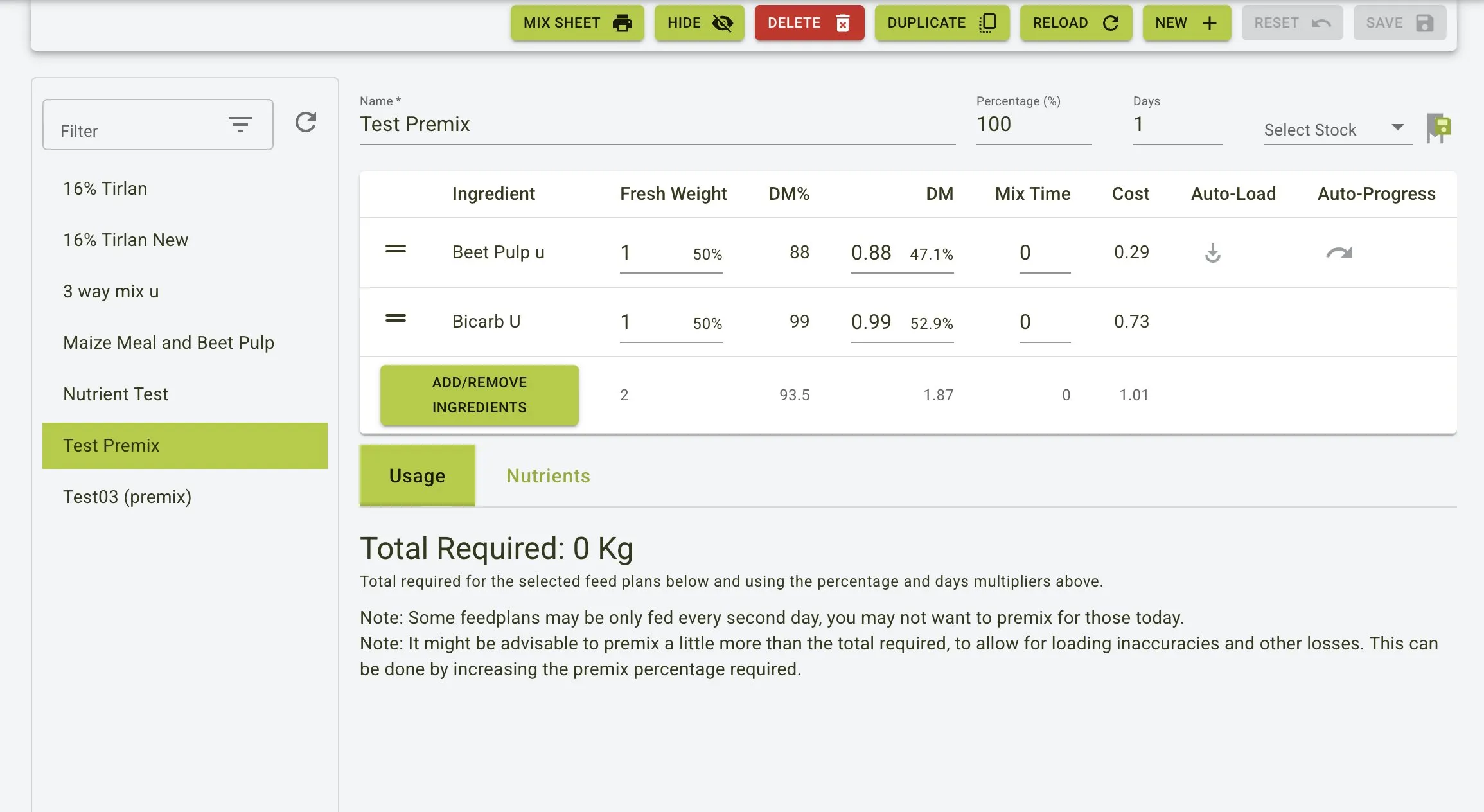
This shows the main premix interface with ingredient listing, nutritional information tabs, and control options. The premix details include ingredient names, fresh weight, dry matter percentages, and mixing parameters.
Creating a new premix
To create a new premix:
- Click the
Newbutton on the toolbar. - Enter a name for your premix in the
Namefield. - Set the
Percentage (%)value (default is 100%). - Specify the number of
Daysthe premix will be used for. - Click the
Add/Remove Ingredientsbutton to select ingredients for your premix. - For each ingredient, enter the Fresh Weight and other parameters as needed.
- Click the
Savebutton to create your premix.
Nutrients view
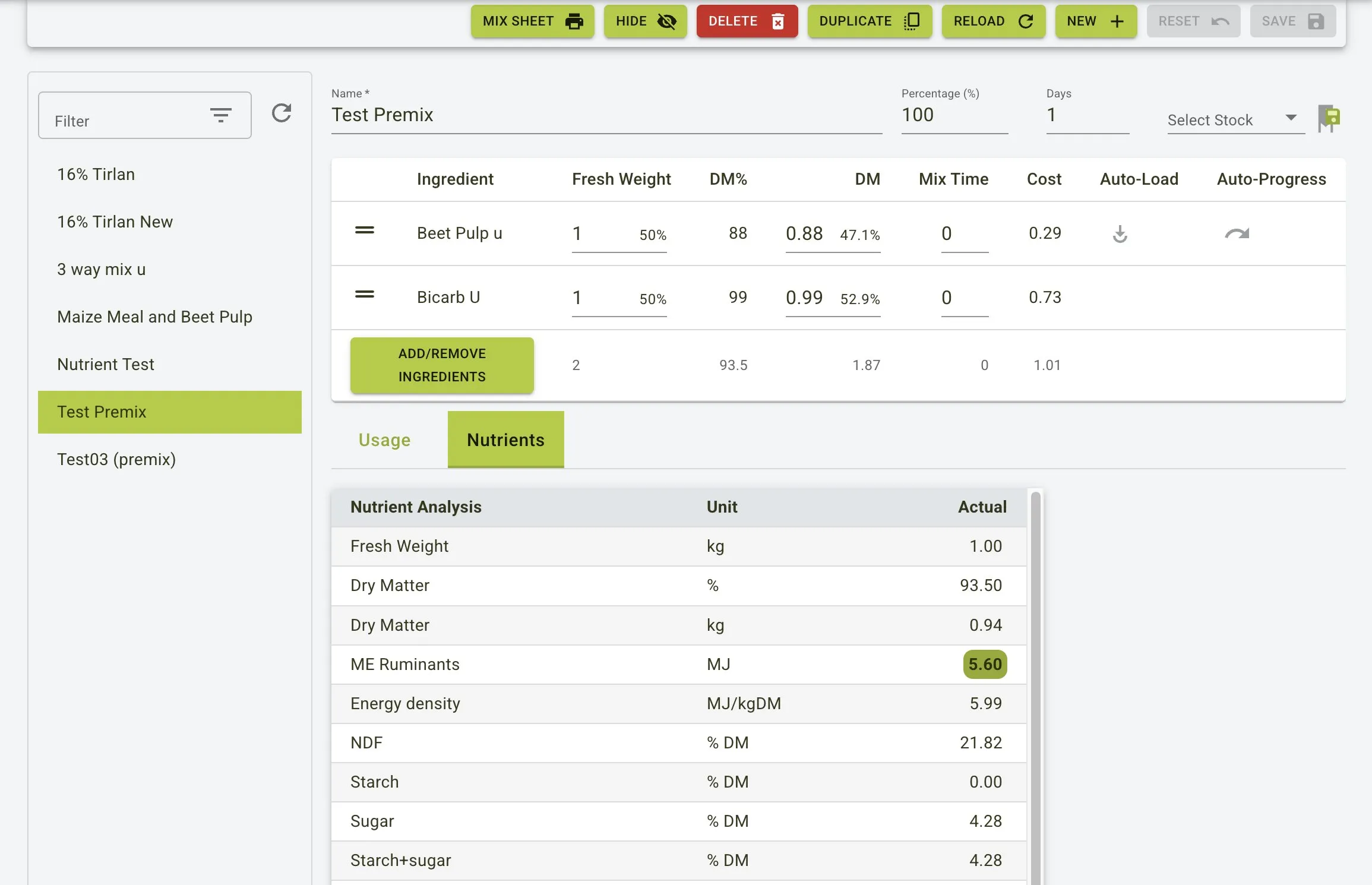
The Nutrients tab provides detailed nutritional analysis of your premix, including:
- Fresh Weight (kg)
- Dry Matter (%)
- Dry Matter (kg)
- (e.g.)
Managing premixes
You can manage your premixes using the toolbar buttons:
MIX SHEET: Generate a printable sheet with ingredient amounts for different total load weightsHIDE: Hide certain ingredients from viewDELETE: Remove the current premixDUPLICATE: Create a copy of the current premixRELOAD: Refresh the premix dataNEW: Create a new premixRESET: Reset any unsaved changesSAVE: Save changes to the premix
Feed Sheet
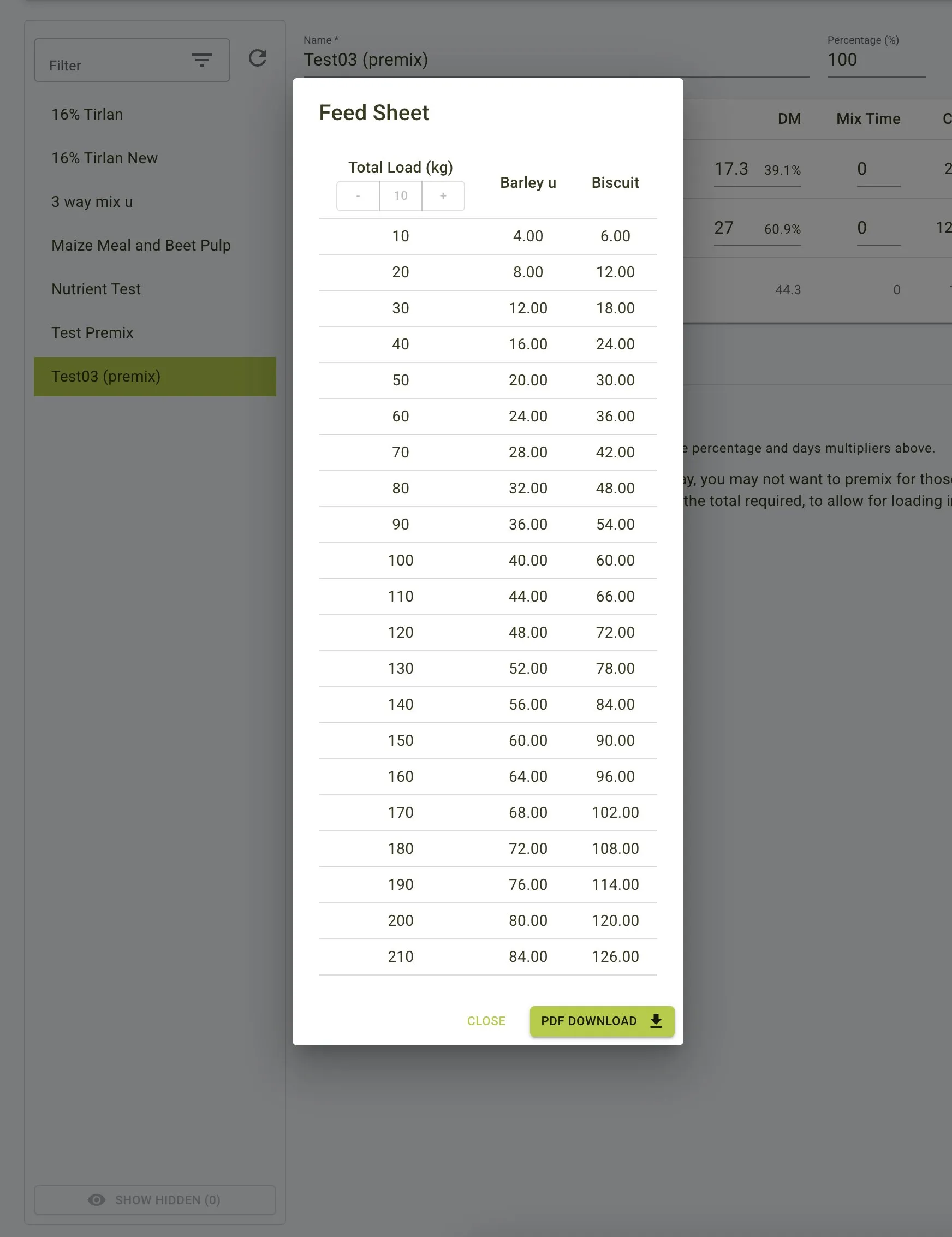
The Feed Sheet provides a table of proportional ingredient amounts based on different total load weights. This is particularly useful when scaling a premix for different batch sizes. The sheet shows:
- Total Load (kg) options
- Corresponding weights for each ingredient at different total loads
- Option to download the feed sheet as a PDF for printing or saving