

Fed Mixes
Description
The Fed Mixes page provides a comprehensive analysis of feed mixes distributed to animals during specific periods. It offers detailed information about ingredients used, quantities distributed, dry matter content, and associated costs. Users can filter by pens, ingredients, and date ranges to analyze specific feeding patterns. The page supports navigation between two primary views: Fed Mixes and Details.
Key Features
Fed Mixes
Main Features
- Displays all ingredients used in feed mixes with detailed information
- Shows comprehensive metrics for each ingredient including fresh weight, dry matter, and cost
- Provides totals at the bottom of each column for quick analysis
- Supports filtering and hiding options for customized views
Fed Mixes Tab View
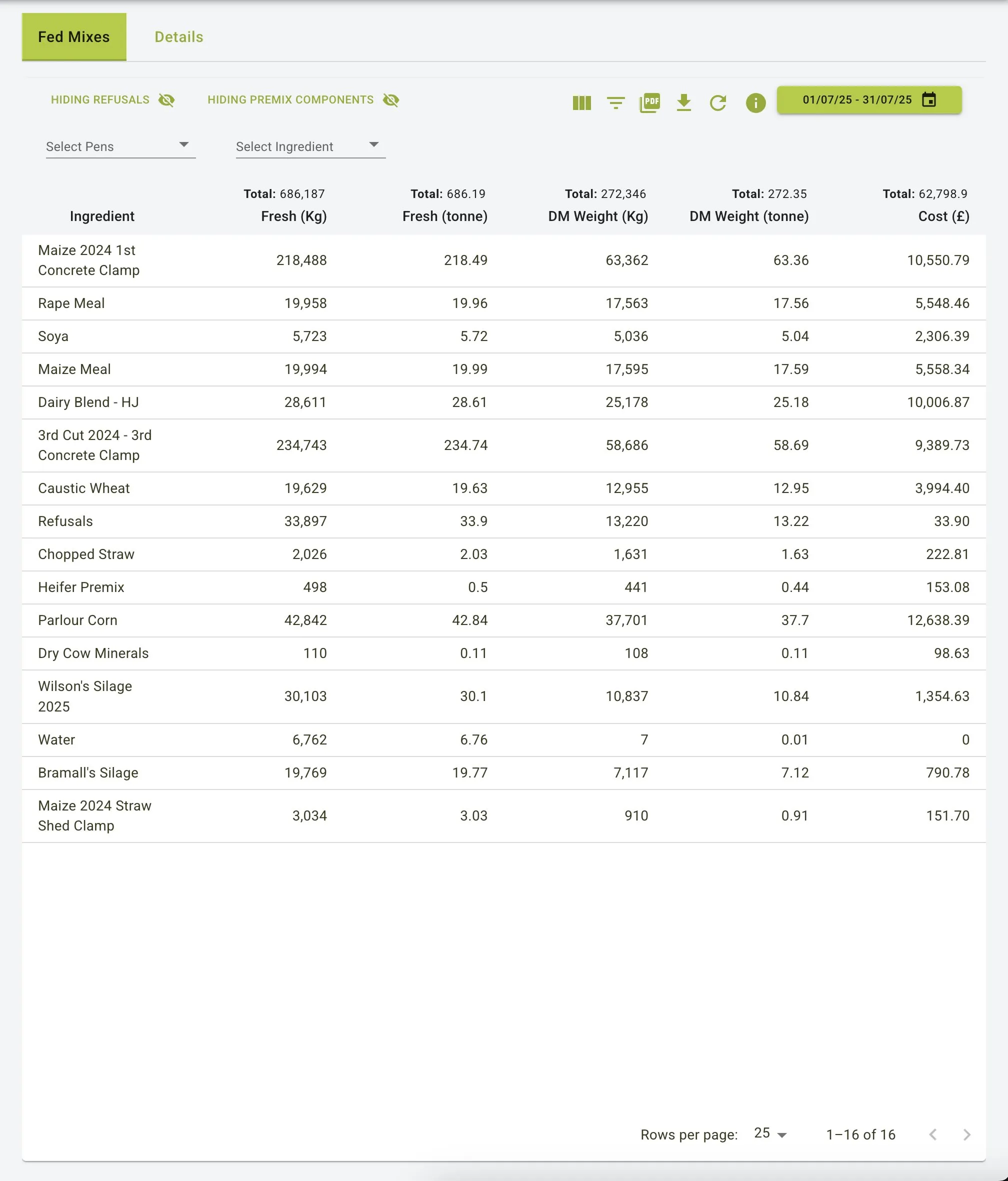
Filters and Controls
- Date Range Selector: Select a specific date range to view fed mixes within that period
- Pen Filter: Filter data by specific animal pens
- Ingredient Filter: Focus on specific ingredients used in mixes
- Hiding Options:
- Hiding Refusals: Toggle to exclude feed refusals from the analysis
- Hiding Premix Components: Option to hide individual components of premixes
Detailed Feed Information
- Each row represents an ingredient with comprehensive information:
- Ingredient: Name of the feed component
- Fresh (Kg): Total weight of the ingredient as fed
- Fresh (tonne): Total weight converted to tonnes
- DM Weight (Kg): Dry matter weight of the ingredient
- DM Weight (tonne): Dry matter weight converted to tonnes
- Cost (€): Total cost of the ingredient used in fed mixes
Totals and Summaries
- Column Totals: Displays sum values for each column:
- Total fresh weight in kg and tonnes
- Total dry matter weight in kg and tonnes
- Total cost of all ingredients
- Pagination: Navigate through multiple pages of ingredient records when the list is extensive
Details
Main Features
- Provides a breakdown of feed distribution by animal groups
- Shows detailed allocation of each ingredient across different groups
- Supports excluding refusals for more accurate analysis
- Highlights the distribution of premixes to specific groups
Details Tab View
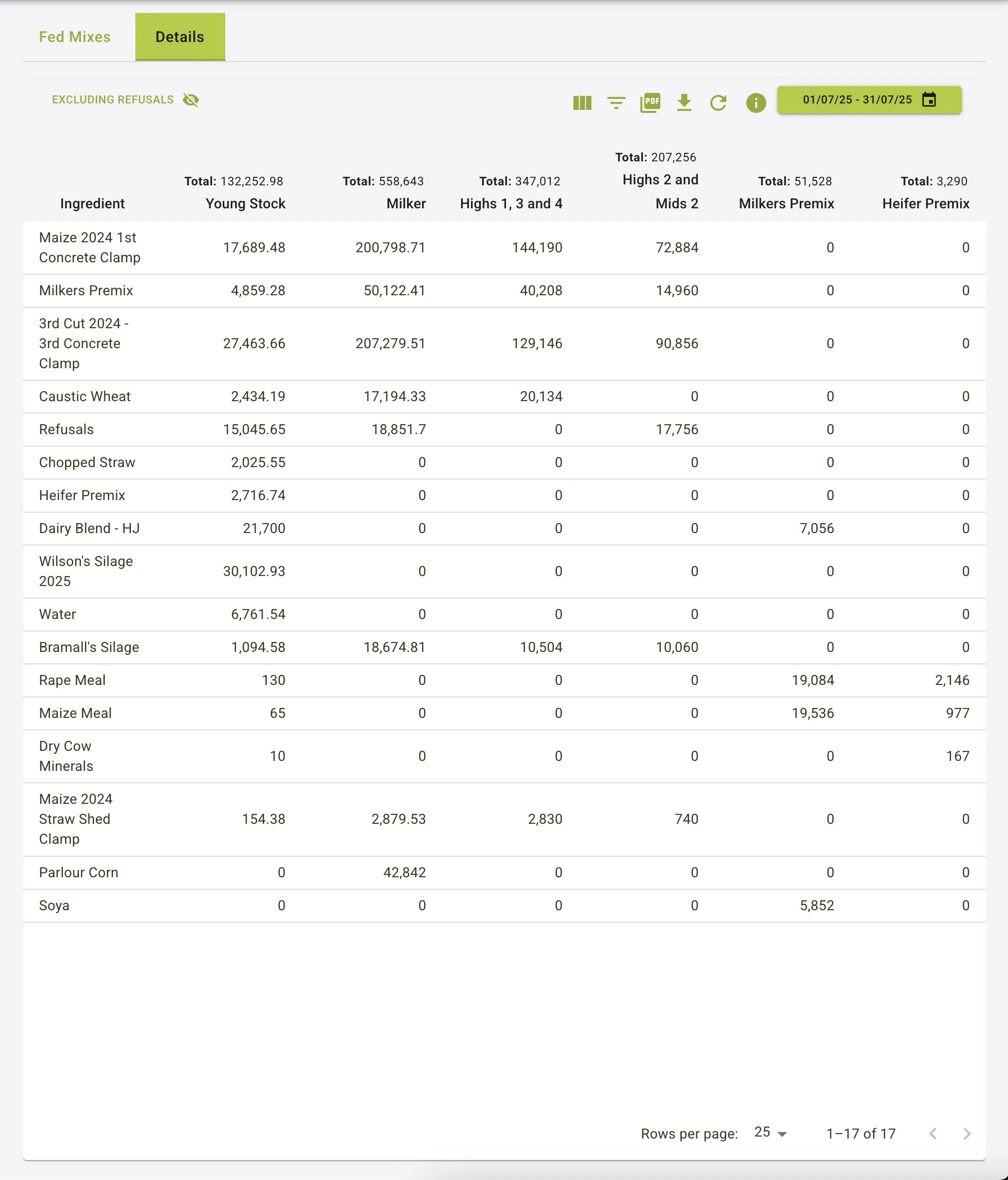
Group-Based Analysis
- Animal Group Columns:
- Young Stock: Feed quantities allocated to young animals
- Milker: Feed quantities for milk-producing animals
- Highs 1, 3 and 4: Feed for high-producing groups
- Highs 2 and Mids 2: Additional production-based groupings
- Milkers Premix: Specialized premix for milking animals
- Heifer Premix: Specialized premix for heifers
Ingredient Distribution
- Each row shows how a specific ingredient is distributed across different animal groups:
- Quantities are shown in kilograms
- Zero values indicate the ingredient is not fed to that particular group
- Higher values highlight the main consumers of each ingredient
Filtering Options
- Excluding Refusals: Toggle to exclude leftover feed from calculations
- Date Range Selection: Analyze feed distribution during specific time periods
Data Exploration
- Row Totals: Total quantity of each ingredient used across all groups
- Column Totals: Total amount of feed allocated to each animal group
- Pagination: Navigate through multiple pages of data when the ingredient list is extensive
Practical Use Cases
Feed Cost Management
- Monitor costs associated with different feed mixes across groups
- Identify high-cost ingredients and optimize their usage
- Track cost trends over time by comparing different date ranges
Nutritional Distribution Analysis
- Ensure each animal group receives the appropriate feed quantity and mix
- Compare dry matter distribution across different animal groups
- Monitor the allocation of premium ingredients to high-producing groups
Inventory and Planning
- Use historical feed usage data to improve inventory management
- Plan future feed purchases based on consumption patterns
- Identify seasonal variations in feed usage
Premix Utilization
- Track the distribution and use of specialized premixes
- Ensure premixes are allocated to the correct animal groups
- Monitor the cost-effectiveness of premix usage
Summary
The Fed Mixes feature serves as a powerful tool for analysing feed distribution across different animal groups. With its comprehensive views (Fed Mixes and Details), it enables users to:
- Track ingredient usage and associated costs
- Monitor feed distribution across different animal groups
- Analyse dry matter consumption patterns
- Optimize feed allocation for improved efficiency and cost management
- Make data-driven decisions about feed purchasing and distribution
By providing detailed data visualizations and flexible filtering options, the Fed Mixes feature helps farm operations maintain accurate records, optimize feed allocation, and control costs.